While HTML5 has a bunch of semantic elements, including new ones like <article> and <nav>, sometimes there just isn’t an element with the right meaning. What we want are ways to extend what we’ve got, to add extra semantics that are machine-readable — data that a browser, script, or robot can use.
Native ways to extend HTML
There were five fundamental ways we could extend HTML 4:
<meta>elementclassattributerelattributerevattributeprofileattribute
In HTML5, rev has fallen by the wayside, becoming obsolete since hardly anyone used it correctly, and because it can be replaced by rel. profile is also obsolete, and there is no support for namespaces in HTML5. However, <meta>, class, and rel are all in HTML5. In fact, <meta> now has spec-defined names and a way to submit new name values, and rel has several new link types defined in the HTML5 specification and a way to submit more too.
Even better, WAI-ARIA’s role and aria-* attributes are allowed in HTML5, and HTML5 validators can check HTML5+ARIA. Other new methods of extending HTML5 include custom data attributes (data-*), microdata, and RDFa. Guest doctor Chris Bewick introduced us to HTML5’s new data-* attribute system, which is perfect for adding private custom data for JavaScript, and we’ll no doubt meet microdata and RDFa sooner or later.
Finally there are microformats. As Dr. Bruce touched on microformats in his article on the <time> element, let’s delve a little deeper into what microformats are and how to use them in HTML5.
Introducing microformats
Microformats are a collection of vocabularies for extending HTML with additional machine-readable semantics. They are designed for humans first and machines second. This is currently accomplished via agreed-upon class, rel, rev and profile attributes, coding patterns, and nesting.
Being machine readable means a robot or script that understands the microformat vocabulary being used can understand and process the marked-up data. Each microformat defines a specific type of data and is usually based on existing data formats — like vcard (address book data; RFC2426) and icalendar (calendar data; RFC 2445) — or common coding patterns (‘paving the cowpaths’ of the web).
Despite their humble beginnings, microformats have also been a runaway success, and they're far more widely deployed than other “big S” Semantic web technologies. For example, many services, such as Twitter and Flickr, offer profile information in hCard format by default, so you may already have a microformatted profile even if you’ve never used microformats before.
Microformat specifications
There are currently 34 microformats specifications (listed below) in varying levels of completion, and you can find out more about them on the microformats wiki.
Published microformats
- Elemental (simple) microformats
- XFN — specify relationships with people
- XMDP — add metadata profiles
- VoteLinks — indicate agreement or disagreement with, or indifference to, the link’s destination
- rel-nofollow — don’t give ‘weight’ to a link (don’t give ‘Google juice’; mainly for search engines)
- rel-license — specify license information
- rel-tag — add tags
- Compound microformats
- hCard — contact information for people and organisations
- hCalendar — time-based information, such as events
- XOXO — outlines
Draft microformats
- adr
- geo
- hAtom
- hAudio
- hListing
- hMedia
- hNews
- hProduct
- hRecipe
- hResume
- hReview
- rel-directory
- rel-enclosure
- rel-home
- rel-payment
- robots exclusion
- Species
- xFolk
Despite being drafts, many of these are in widespread use.
Microformat patterns
These common coding patterns are just best practices that are frequently used in writing plain old semantic HTML (POSH) to create microformats.
<abbr>design patternclassdesign pattern- date design pattern
- datetime design pattern
- include pattern
- value
classpattern reldesign pattern
These specifications and patterns cover many common types of data. They’ve been created by a grass-roots organisation of interested people, and anyone is welcome to contribute or even propose a new microformat.
A lightning introduction to using microformats
For those of you that haven't used microformats before, I’ll briefly introduce some simple microformats — hopefully so simple you’ll be encouraged to use them right away!
Using rel-license for licensing information
Adding license information is quite a common activity, and while we can add a link to Creative Commons or another license easily enough, someone would have to read it to understand the content’s license:
<small>This article is licensed under a
  <a href="http://creativecommons.org/licenses/by-nc-sa/2.0/">
  Creative Commons Attribution Non-commercial Share-alike
  (By-<abbr>NC</abbr>-<abbr>SA</abbr>) license</a>.
</small>
If this information was machine-readable, search engines could use it to help consumers searching by license. By using the rel-license microformat to add rel="license" to the license link (indicating it’s the license for the page’s main content), we can do just that:
<small>This article is licensed under a
  <a rel="license" href="http://creativecommons.org/licenses/by-nc-sa/2.0/">
  Creative Commons Attribution Non-commercial Share-alike
  (By-<abbr>NC</abbr>-<abbr>SA</abbr>) license</a>.
</small>
This article is licensed under a Creative Commons Attribution Non-commercial Share-alike (By-NC-SA) license.
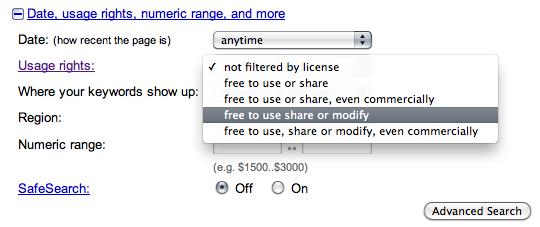
This may be so easy you don’t even realise you’ve just microformatted the link! In fact, Google already uses this data to allow us to search by license (look in advanced search, in the extra options).
Using XHTML Friends Network (XFN)
Maybe we should term this one eXtensible Friends Network instead  XFN is a way of specifying your relationship with people — everything from “met” to “sweetheart” — using the
rel attribute on a link to their homepage.
There are two main values: (1) rel="contact" (someone you know how to get in touch with), and (2) rel="me". The rel="me" value allows you to claim ownership of your various websites, including your accounts on social networks. For example, I could have a profile with a link to my Twitter account:
<p>Oli Studholme — <a href="http://twitter.com/boblet">follow me on
  Twitter (@boblet)</a></p>
A person can infer that @boblet is my Twitter username, but by adding rel="me" we can state this relationship in a machine-readable way.
<p>Oli Studholme — <a rel="me" href="http://twitter.com/boblet">follow me on
  Twitter (@boblet)</a></p>
In order to actually work, this would need to be on my personal homepage, with the same homepage added to my Twitter profile. By doing this, a social web app that understands XFN could confirm @boblet is me, check my friends on Twitter, check if those people are already registered, and then allow me to follow them all with one click — much easier.
For more on this idea, check out Identity consolidation and the XFN rel="me" value, the RelMeAuth proposal on the microformats wiki, and Google’s Social Graph API. It seems Facebook is supporting rel="me" too.
Rel-license and XFN are simple rel-based microformats, but even with their simplicity you can see the potential power in this machine-readable stuff. Now let’s look at microformats for contact and event information.
Using hCard for contact information
Almost every website has an about page with some contact information:
<p>Oli Studholme — <a href="http://oli.jp/">http://oli.jp</a>, or
<a href="http://twitter.com/boblet">follow me on Twitter (@boblet)</a>.</p>
Unfortunately, adding someone’s contact information to your phone or address book generally involves a lot of copying and pasting. If the data was machine-readable, however, we could use a tool to do that. Let’s add the hCard microformat to this code snippet.
<p class="vcard"><span class="fn">Oli Studholme</span> —
<a class="url" href="http://oli.jp/">http://oli.jp</a>, or
<a class="url" href="http://twitter.com/boblet">follow me on Twitter
(@<span class="nickname">boblet</span>)</a>.</p>
Oli Studholme — http://oli.jp, or follow me on Twitter (@boblet).
So we’ve added a bunch of classes. There’s nothing special about that, of course, until you realise they're all part of the hCard microformat. The first one is vcard on the containing <p> element, indicating that there's hCard data here. Then we have fn, which stands for full name, url for an associated homepage, and nickname for, well, a nickname.
This is a simple example, and in fact a valid hCard only requires vcard and fn. But hCard has much more depth. We can mark up all kinds of contact-related data: addresses, company information, even a profile photo. For example, we can explicitly specify a given name and family name (this is essential for Chinese, Korean, Japanese and Vietnamese names), even middle names and titles.
<span class="vcard"><span class="fn n" lang="ja"><span class="family-name">
スタッドホルム</span>・<span class="given-name">オリ</span></span></span>
The additional n value is actually required, but can be inferred and therefore omitted for names that follow these patterns (the so-called “implied n optimisation”):
- given-name family-name
- family-name, given-name
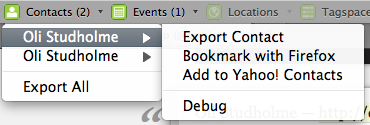
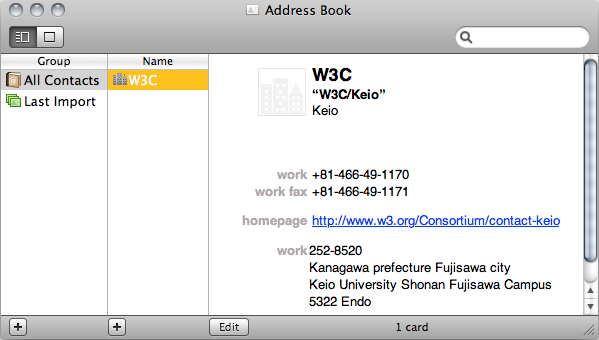
So what’s the benefit of this? Well, there are several tools that will convert this hCard-microformatted data into a vcard file we can download and automatically add to our address book. Nifty!
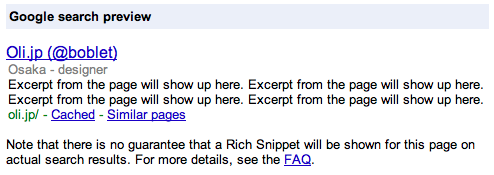
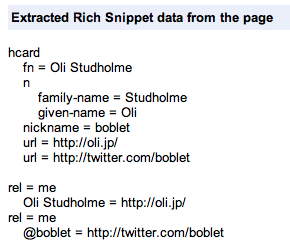
It’s also recognised by Google’s Rich Snippets and Yahoo’s SearchMonkey, useful for the contact information on any company website.
Organisations, addresses, and phone numbers
Smaller company websites often have the company name and contact details in the footer, so let’s briefly see how to do that.
<p class="vcard">
<a class="fn org url" href="http://www.w3.org/Consortium/contact-keio" title="Contact Information for W3C/Keio"><span class="organization-name">W3C</span>/<span class="organization-unit">Keio</span></a><br>
<span class="adr"><a class="extended-address" href="http://www.keio.ac.jp/english/about_keio/campus_info/sfc1.html">Keio University Shonan Fujisawa Campus</a><br>
<span class="street-address">5322 Endo</span>, <span class="locality">Fujisawa city</span>,<br>
<span class="region">Kanagawa prefecture</span> <span class="postal-code">252-8520</span> <b class="country">Japan</b><br>
<span class="tel">Telephone: <span class="value">+81-466-49-1170</span></span><br>
<span class="tel"><span class="type">Fax</span>: <span class="value">+81-466-49-1171</span></span></span>
</p>
W3C/Keio
Keio University Shonan Fujisawa Campus
5322 Endo, Fujisawa city,
Kanagawa prefecture 252-8520 Japan
Telephone: +81-466-49-1170
Fax: +81-466-49-1171
By using fn together with org we can create an hCard for an organisation. Each part of the address is specified (<span>licious!), and we’ve also included a phone number (tel’s default type is voice) and fax number (specifying type and using the value class pattern).
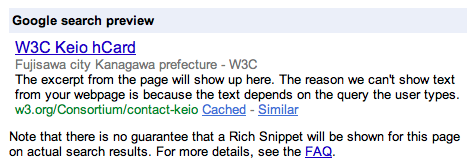
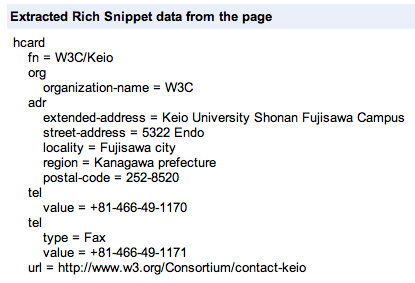
And with Operator, we can add this hCard to our computer’s address book in one click. If you’ve ever manually added an address to your address book, you’ll love this 
Using hCalendar for event information
Let’s briefly look at marking up a simple event. Here’s one I’m involved with:
<h3><a href="http://atnd.org/events/5181">WDE-ex Vol.11 —
  Designing for iPad: Our experience so far</a></h3>
<p>July 21st 19:00-20:00 at
<a href="http://www.apple.com/jp/retail/ginza/map/">Apple Ginza</a>.</p>
Just by reading, we understand the event name, date, time, and location. But this information is difficult for computers to extract. By using the hCard microformat, it will be machine-readable.
<div class="vevent">
  <h3><a class="url summary" href="http://atnd.org/events/5181">
  WDE-ex Vol.11 — Designing for iPad: Our experience so far</a></h3>
  <p><span class="dtstart"><abbr class="value" title="2010-07-21">
  July 21st</abbr> <span class="value">19:00</span></span>-
  <span class="dtend"><span class="value">20:00</span></span> at
  <a class="location url" href="http://www.apple.com/jp/retail/ginza/map/">
  Apple Ginza</a></p>
</div>
WDE-ex Vol.11 — Designing for iPad: Our experience so far
July 21st 19:00-20:00 at Apple Ginza
We’ve added vevent on a wrapping element to indicate this is an hCalendar. Events are required to have a summary and a starting time, so we’ve added summary and indicated the starting date and time using dtstart. While historically datetimes were indicated using <abbr title="">, the required ISO 8601 format (for example “2010-07-10T19:01:29”) is very unfriendly to screen readers. Imagine having those numbers read to you! For this reason, the hCalendar specification recommends either breaking the datetime into separate date and time pieces, using the value class pattern, or possibly doing both. The specification is also smart enough to know that if the end datetime dtend is only a time, then it’s on the same day, so we don’t need to specify the date again, although tool support for this is spotty. Finally, we’ve added some URLs, one of which is for the event’s location.
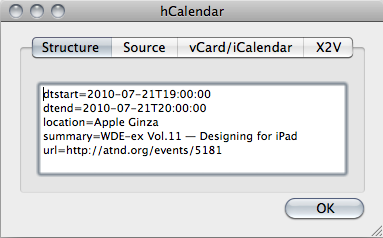
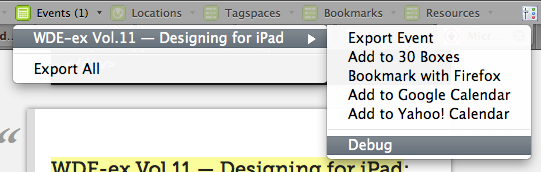
With this data now being machine-readable, we can do things with it. For example, we can add the event to a calendar app with one click.
Using microformats in HTML5
So now we’ve had a whistle-stop introduction to microformats and gotten a glimpse of the benefits they provide. The question is: Can we use them in HTML5 pages? Let’s start with the good news.
As most microformats use only class and/or rel — basic parts of HTML that remain unchanged in HTML5 — these microformats are completely fine in HTML5. Yay! However there are a few wrinkles to keep us on our toes.
The rev-based VoteLinks microformat
One of the things that’s been cut in HTML5 is the rev attribute, which was the reverse relationship of rel. On the question of whether microformats should use rev, the microformats wiki states:
The short answer is unfortunately “NO”. Use of “rev” should be avoided. However, VoteLinks’ use of rev has been grandfathered since it was such an early use.
The VoteLinks specification mentioned here allowed us to add vote-for, vote-against, or vote-abstain values to a link via the rev attribute, indicating agreement, disagreement, or indifference (respectively) toward the destination URL. However, as the default state of a link is an implicit vote of agreement, and as the rel-nofollow link microformat is equivalent to vote-abstain, the only one we’re unable to replicate is vote-against (no link? ). I expect that the microformats community will eventually come up with rel-based equivalent names for VoteLinks, but until then you’ll need to avoid this microformat when using HTML5.
The profile attribute
The profile attribute is obsolete in HTML5, as it was determined unnecessary. Currently, microformat profiles are very rarely used in the wild and are not required, so this probably won’t affect you.
Microformats specifications vs HTML5
While microformats using class and rel work fine, some of the new features in HTML5 aren’t supported yet. The Microformats in HTML5 page on the microformats wiki currently begins:
This page is to document future use of microformats in HTML 5. None of the items documented are supported now, and may change upon proper development within the microformats community, or changes in the HTML 5 specification.
This includes the nifty new <time datetime=""> element, which would be perfect for microformat times, such as dtstart and dtend in the hCalendar microformat. It’s also true for adding microformats via microdata rather than class and rel. There has been talk of a general way to map any microformat into microdata, but this hasn’t eventuated as of yet.
Microformats-consuming tools (or, the problem with HTML Tidy)
The microformats wiki’s warning about <time> brings us to another caveat: tool support. Even if <time datetime=""> was valid in the microformats spec, at present none of the microformats tools know to get this information from the datetime="" attribute. Now, you could wrap <time datetime=""> around a microformats dtstart or dtend:
<time datetime="2010-07-21T19:00:00+09:00"><span class="dtstart">
  <abbr class="value" title="2010-07-21">July 21st</abbr>
  <span class="value">19:00
</span></span></time>
However, as the <time datetime=""> data is then not explicitly part of the microformat, doing this isn’t really getting you anywhere, except bloated code-ville.
Worse, H2VX.com — a handy microformats tool allowing you to convert hCard and hCalendar microformats into vcard and ical files for users to add to their address books and calendars, respectively — doesn’t see microformat class names on any new HTML5 elements. That means while we can use HTML 4-based microformats code in HTML5 with no problems, if we want to use H2VX we’ll have to add microformats classes to wrapping elements from HTML 4 (such as <div>s and <span>s), and not on any new HTML5 elements. For example, in the code snippet above, you can’t add class="dtstart" to <time> to remove the wrapping <span class="dtstart">, as then H2VX wouldn’t see dtstart.
Microformats Tool support
| Operator | Optimus | H2VX | |
|---|---|---|---|
| can use classes on HTML5 elements | yes | yes | no |
supports HTML5’s <time> | no | no | no |
adding <time> as a wrapper | ok | ok | ok |
| Understands the value class pattern | yes | no | yes |
Understands implied dtend | yes | no | no |
| Understands timezones | yes | yes | no |
Until <time> is part of a microformat specification, I don’t expect anyone will support it. However given how … non-micro expressing datetimes is in microformats currently, I hope they do soon!
Conclusion
So where does that leave us? Well, if you keep the above caveats in mind you can safely use microformats in HTML5. Google has no problem with microformats in HTML5, even on new elements, and I’m under the impression that Yahoo is the same. However, remember that if you want to offer a “click to download” link via H2VX, you’ll have to avoid adding hCard and hCalendar microformat classes to new HTML5 elements. This will probably involve some extra wrapping <div> or <span> elements, but that’s standard operating procedure for microformats anyhow.
An important thing to note about microformats: as wonderful as they are, the current method of using the plain old semantic HTML tools of class, rel, and coding patterns is something of a brilliant hack. The use of class (an author playground) and the lack of use/demise of profile, combined with the complexity of coding to detect for microformats in the wild, means that native browser support is unlikely anytime soon. There was the expectation that at some stage there’d be a better way to easily add extra semantic information for others to use. In future articles, we’ll look at microdata and RDFa, and see what they have to offer over plain old semantic HTML.
Despite this, if you have common types of data in your content that are covered by a microformat, and you want to make them machine-readable for others (and who wouldn’t), you should definitely consider using microformats in HTML5. Adding microformats is basically adding a lightweight API to your content, and is simple enough that even a designer can do it! This helps search engines and savvy users to more easily use your content. Check out the microformats wiki, grab the indispensable microformats cheat sheet by Brian Suda, peruse these books and DVDs on microformats, and start getting (even more) semantic!
Books and DVDs
 Microformats: Empowering Your Markup for Web 2.0 — John Allsopp
| | | | Designing with Microformats for a Beautiful Web (DVD) — Andy Clarke
| | | Microformats Made Simple — Emily P. Lewis and Tantek Celik
| | |
