HTML5 may be the latest and greatest technology, but some browsers don’t have native support for the new semantic elements. Let’s forget for a minute about the even sexier functionality that the elements can bring, such as full control over the <video> element, and just focus on getting the elements to be rendered.
The problematic a-grade browsers are: IE8 and below, and Firefox 2 and Camino 1 (these two browsers use the same rendering engine, which is why they’re both affected).
IE doesn’t style HTML5 elements
IE has it’s own set of issues compared to the Firefox issues which I’ll discuss next. IE quite simply doesn’t see the elements for them to be styled.
This means if you have an <aside> that floats to the right, IE isn’t going to style the element what so ever, because it just doesn’t acknowledge it’s existence.
In fact, this is exactly the same issue that we had before HTML5, where the <abbr> element couldn’t be styled in IE6 – so all manner of work arounds were created (let me add that we’ll also fix the <abbr> element while we fix IE to recognise HTML5).
The fix
There is hope! We can use JavaScript to trigger those elements under IE’s nose so that you’re able to style. This fix works in IE6 and above (the a-grade browsers).
This is achieved by using an HTML5 shiv posted by Sjoerd Visscher.
The fix is to simply create the new element using JavaScript, and voilà, IE is able to style the elements:
document.createElement('header');For example, say you wanted to style the <time> element to italics, here’s the problem we see:
<!DOCTYPE html>
<html>
<head>
  <title>Header test</title>
  <style>
  time { font-style: italic; }
  </style>
</head>
<body>
  <time datetime="2009-09-13">my birthday</time>
</body>
</html>
In IE before we apply the fix:
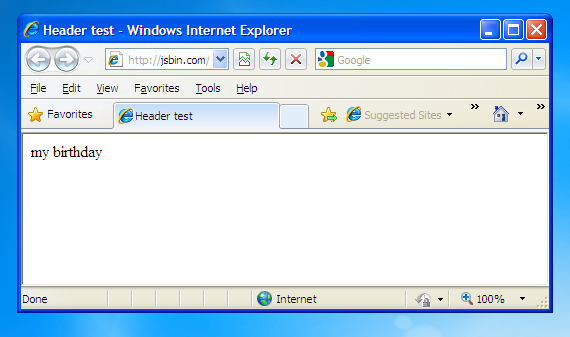
And now by including the fix:
<!DOCTYPE html>
<html>
<head>
  <title>Header test</title>
  <style>
  time { font-style: italic; }
  </style>
  <script>document.createElement('time');</script>
</head>
<body>
  <time datetime="2009-09-13">my birthday</time>
</body>
</html>
And now after we have the fix – it’s correctly styled:
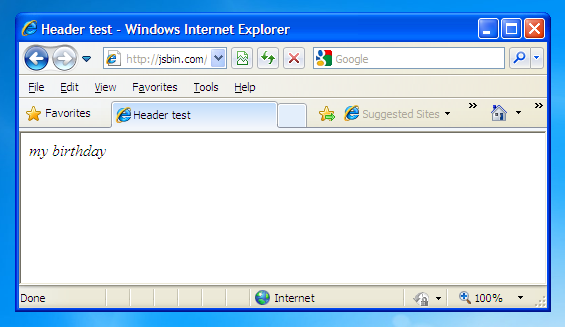
One hit solution
For convenience, I wrote a single JavaScript file that can be included to trigger all the HTML5 elements (and the <abbr> element) in to existence for IE.
Download the IE HTML5 enabling script
Include the script in your <head> tag and it will allow you to style the elements appropriately in IE:
<!--[if lte IE 8]>
<script src="html5.js" type="text/javascript"></script>
<![endif]-->
Note that I’ve used a conditional comment to only apply this to IE8 and below. It’s my hope that IE9 and onwards will support HTML5 elements – but when that day comes, make sure to double check the conditional!
Conditions & Gotchas
JavaScript required
Of course this means that you design now depends on JavaScript. My personal feeling on this, is if you’ve used semantic markup for your site, then when the elements can’t be styled, the content is still completely readable.
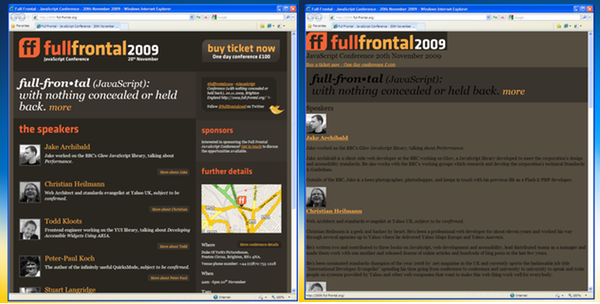
Here’s a screenshot of the Full Frontal web site, written using HTML5 elements, with and without JavaScript enabled in IE – you can see the content is still readable because it cascades down correctly (similarly as if CSS was disabled):
A little head is always good
If you create the new element, and don’t use a <body> tag (which is perfectly valid), IE will put all those created elements inside the <head> tag. Pretty crazy, but something that’s easily avoided if you always use the <head> and <body> tags in your markup. Leif Halvard explains further with demos
Firefox 2 and Camino rendering bug
Both Firefox 2 and Camino run have a bug in the render engine, specifically the versions prior to 1.9b5:
Firefox 2 (or any other Gecko-based browser with a Gecko version pre 1.9b5) has a parsing bug where it will close an unknown element when it sees the start tag of a “block” element like p, h1, div, and so forth.
According to the W3 Schools stats, Firefox 2 only has around 3% of the market – which may be low enough to justify ignoring.
However, without addressing this issue, a site can look really quite bad in these rendering engines.
The bug is to do with how the Gecko rendering engine doesn’t recognise the new elements. Roughly explained: when Gecko runs in to an unknown element, in removes it’s contents, and puts it next to the element.
For example, the following code:
<body>
  <header><h1>Title</h1></header>
  <article><p>...</p></article>
</body>
Is rendered as if the markup were:
<body>
  <header></header>
  <h1>Title</h1>
  <article></article>
  <p>...</p>
</body>
The visual result is similar to IE running without JavaScript – though subtly different, as the DOM tree is actually in a different order to how you intended as an author.
The fix
There’s two approaches to fixing this issue, and so far I’ve only successfully been able to use the non-JavaScript approach.
The JavaScript approach is to cycle through the DOM tree rearranging the elements as the issues are encountered.
Simon Pieters has a small working example of how this can be done (towards the bottom of the page), however in practise I personally found it didn’t work for my markup. It’s definitely solvable using JavaScript, but it still needs work to have something that works for all permutations of markup.
The second approach is to serve Gecko XHTML. I’ve found this to be the easier approach if you’re either generating a page dynamically using something like PHP, or if you can create your own .htaccess file to make use of mod_rewrite.
XHTML
The first change in the markup you need to include is the <html> tag needs the xmlns attribute – so add this to all your pages:
<html lang="en" xmlns="http://www.w3.org/1999/xhtml">Next we need to sniff the user agent string (typically a bad approach, but justifiable for our 3% of Firefox users). If the Gecko build is less than 1.9 then we need to serve the content type as application/xhtml+xml.
If you want to use mod_rewrite in an .htaccess file (or the httpd.conf file), you need the following rules:
RewriteCond %{REQUEST_URI} \.html$
RewriteCond %{HTTP_USER_AGENT} rv:1\.(([1-8]|9pre|9a|9b[0-4])\.[0-9.]+).*Gecko
RewriteRule .* - [T=application/xhtml+xml]
This rule sends the xhtml content-type to all Gecko based browsers where version is less than 1.9, or “rv:1.9pre” or “rv:1.9a” or “rv:1.9bx” where x is less than 5.
If you don’t want to use the mod_rewrite approach, you’ll need to manually send the header in your server side scripts.
Here’s the solution for a PHP script:
if (preg_match('/rv:1\.(([1-8]|9pre|9a|9b[0-4])\.[0-9.]+).*Gecko/', $_SERVER['HTTP_USER_AGENT'])) {
    header('Content-type: application/xhtml+xml');
}
This snippet needs to be the first thing that’s printed by your script – i.e. as early as possible in your code.
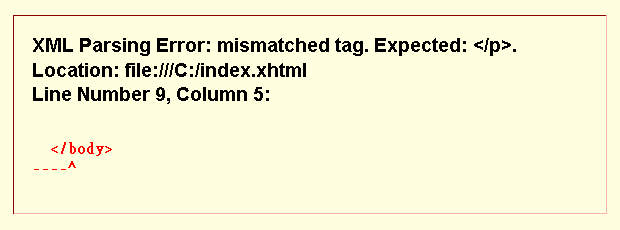
Gotcha: Yellow Screen of Death
The Yellow Screen of Death is where there’s an XML error on the page. If we’re serving markup as XML and telling the browser to strictly interpret this as XML, if we serve any characters it doesn’t know about, it’s going to bork:
There’s a few places where this can be a problem.
Strict markup
You need to ensure your markup is squeaky clean, but that’s easy, because you’re already a markup Jedi, right?
HTML entities
HTML entities are a no-no. i.e. • isn’t going to fly. You need to use XML entities – which are the numerical representation of these characters.
I built a tool a while back that shows you the HTML entity and the XML value of that entity so you can look them up: HTML entity lookup.
For example: • is 8226, so the XML entity is •.
User generated content
If your site relies on any user generated content, for example: blog comments, then you need to sanitise the output to ensure there’s no validation issues to trigger the Yellow Screen of Death.
This last issue alone may be justification to investigate the JavaScript solution further.
That all said and done, Firefox has a very good automated upgrade path, and looking at the stats on W3Schools, I think it’s safe to say the market share with this Gecko bug is going to deplete very quickly to nothing.
Further reading
- Firefox 2 rendering issue on WHATWG Blog
- IE / missing head tag issue
- HTML5 shiv
- HTML5 enabling script

52 Responses to “ How to get HTML5 working in IE and Firefox 2 ”
Comment by Ryan Roberts at
Great article, this has cleared up a few mind boggling issues I’ve had with Firefox 2. I already knew about the IE fix but your Javascript file looks even better.
Comment by Paul Lloyd at
After this weekend’s standrads.next meet-up, I wondered whether there was an alternative workaround to the IE issue, by using IE’s HTC (HTML Components) functionality. Quickly looking over the documentation I was able to find that you can create new elements with this tool, but they have to be name spaced. I only know enough to be dangerous however – is there any milage investigating a solution that follows this route at all?
Comment by Greg Hemphill at
This IE hack looks very promising… makes me think using html 5 is going to be a viable option sooner than I had thought.
Comment by Anon at
Your link for ‘a-grade browsers’ is broken…
Comment by Remy Sharp at
@Paul – I know what you mean about the HTC solution, and there are a couple of “solutions” to getting HTML5 elements to being styled without JavaScript.
First up – HTC, Dean Edwards’
<abbr>solution, but it requires the markup to be prefixed withhtml:. Frankly, if I have to prefix every element withhtml:it’s going to really mess with the markup, and having to maintain itThe second solution was via the WHATWG blog, which does work for a certain amount of markup, but as Simon points out, it’s not particularly scalable, specifically, you still can’t style the HTML5 elements, only those elements within those new elements, i.e. you can style:
using:
Comment by Dylan Parry at
I’m probably alone here, but I really don’t understand what you’re trying to say in the section “A LITTLE HEAD IS ALWAYS GOOD”. The link to a further explanation, with examples, left me even more confused than before I’d read it!
Comment by Ken at
“If you create the new element, and don’t use a tag (which is perfectly valid), IE will put all those created elements inside the tag.”
I’ve read this sentence 10 times and I still have no clue what it means. (There’s no tag, but it puts elements in … what?)
Comment by Remy Sharp at
@Dylan + @Ken – damn, some markup has been stripped from the post. It’s missing the word <head> before the word ‘tag’ in both instances. I’m updating the post now to get the code back in.
Comment by Sven at
Actually, & is a bad example for an invalid HTML entity because it is also a XML entity and every parser should understand it (the other XML entities are ", ', < and >). But you could always use the numerical entities, of course.
Comment by Disfruta de HTML5 en Internet Explorer y Firefox 2 | aNieto2K at
[...] sus nuevas capacidades. Y es que cada vez más los navegadores lo están adoptando, aunque aún es muy pronto para poder usarlo libremente sin preocuparnos de navegadores menos modernizados (IE8 e inferiores, Firefox [...]
Comment by Disfruta de HTML5 en Internet Explorer y Firefox 2 : Blogografia at
[...] sus nuevas capacidades. Y es que cada vez más los navegadores lo están adoptando, aunque aún es muy pronto para poder usarlo libremente sin preocuparnos de navegadores menos modernizados (IE8 e inferiores, Firefox [...]
Comment by pligg.com at
Get HTML5 working in IE…
If your wanting to start using HTML5 and have your site work in IE also, this post will help you learn how to make that happen. Go HTML5!…
Comment by How to get HTML5 working in IE and Firefox 2 « Jasper Blog at
[...] Read more: <html>5doctor [...]
Comment by » HTML5: naudoti negalima laukti - Kaip tapti ekspertu? at
[...] taipogi nenori pripažinti naujų žymų ir pritaikyti joms stilių, tačiau tai nesunkiai išsprendžiama Javascript pagalba. Jeigu vien Javascript sprendimas netenkina (unobtrussive, progressive enhancement, etc) – [...]
Comment by Torrance at
Erm, let me escape my tags. That should have read:
If you create the new element, and don’t use a <BODY> tag (which is perfectly valid), IE will put all those created elements inside the <head> tag. Pretty crazy, but something that’s easily avoided if you always use the <BODY> tag in your markup
Comment by John Resig - HTML 5 Parsing at
[...] there you can check the site HTML 5 Doctor for additional details on how to get the new HTML 5 elements working in all [...]
Comment by Remy Sharp at
@Torrance – darnit! You’re right, thanks – corrected!
Comment by Lewis Litanzios at
‘A little head is always good’ – you joker, haha. Cheers for ya time.
Comment by Delicious Bookmarks (2009-07-04 - 2009-07-09) | Josh Babetski : Quixotic Bravado at
[...] How to get HTML5 working in IE and Firefox 2 | HTML5 Doctor [...]
Comment by Eternal Moonwalk, HTML 5 Doctor and more | Engage Interactive Blog | Web design Harrogate at
[...] got an especially useful article about implementing HTML5 on Internet Explorer 6/7 and Firefox 2, so there’s no real excuse not to start embracing the technology, even on commercial [...]
Comment by eric at
ie hack, bleh.
I’m just going to make a HUGE red error div at the top of my website for IE viewers telling them basically “gg dipship, you’re using ie, here’s a link to firefox.”
Comment by zcorpan at
& does fly because it’s one of the five predefined entities in XML.
There are also another possible replacement for HTML entities in XML: just straight characters. There’s no need to escape non-ASCII if you’re using UTF-8.
Comment by zcorpan at
s/&/&/
Comment by Remy Sharp at
@Zcorpan – darn, I was going to use • as the example, but I wasn’t sure if people would know what I meant. I’ll change the article to correct it.
Regarding leaving the characters as plain – I couldn’t get this to work – and it threw up the yellow screen of death (this was with http://full-frontal.org which uses UTF-8 encoding). If you have an example of this working, then I’ll update the post. It might be because my page is a polyglot document (works as both XHTML and HTML 5) but I doubt if this is the cause.
Thanks for the catch!
Comment by How to get HTML 5 working in IE and Firefox 2 // HTML Five at
[...] HTML5 Doctor writes a detailed article on how to get HTML 5 working in IE and Firefox 2. [...]
Comment by DOM vs namespace pour implémenter HTML5 sur IE6, IE7, Firefox2, Camino, etc. at
[...] point sur les avantages et inconvénients de ces deux techniques, voici l’excellent article How to get HTML5 working in IE and Firefox 2 suggéré par Adrien Leygues dans le fil de discussion en [...]
Comment by Paymeplease at
I must agree the Hack looks very promising
Comment by Cool articles – SEO, blogging, internet marketing(july13-july19 2009) « Stefanm, my link collection at
[...] How to get HTML5 working in IE and Firefox 2(IE doesn’t style HTML5 elements, Firefox 2 and Camino rendering bug); [...]
Comment by HTML5 Tips: structral elements, Doctype and ARIA » iheni :: making the web worldwide at
[...] 2 and Camino can be fixed using JavaScript or by serving Gecko XHTML. Getting HTML5 working on IE and Firefox 2 from HTML Doctor has a good article about how to do [...]
Comment by CaoInteractive Blog » Blog Archive » 23 Essential HTML 5 Resources at
[...] How to get HTML5 working in IE and Firefox 2 – Another great article from HTML 5 Doctor [...]
Comment by Adam at
Is there a way to stop IE complaining about the script activex security risk when defining the html5 elements it doens’t know yet?
Comment by BWS Blog » Blog Archive » We are CSS 2.1 Complient!!!! – HTML5 possibillities!!!! at
[...] the HTML5 IE issues it would be best to check out: How to get HTML5 working in IE and Firefox 2. This should help solve a lot of issues and problems that IE presents when trying to render the [...]
Comment by Web Standards, Accessibility & More » HTML 5 Resources at
[...] How to get HTML5 working in IE and Firefox 2 [...]
Comment by HTML 5 Resources « AccessTech News at
[...] How to get HTML5 working in IE and Firefox 2 [...]
Comment by HTML 5 Resources « The BAT Channel at
[...] How to get HTML5 working in IE and Firefox 2 [...]
Comment by Defining The Vomit Bug at
[...] The old Gecko engine (for Camino and Firefox 2) suffers from the same vomit bug when introducing new (or HTML5) elements (which can be fixed by serving as XHTML). [...]
Comment by Arlen at
@paul – You can create elements inside the htc, but the existence of those elements doesn’t get passed out to the rendering engine without namespacing. So, I thought, why not simply create the new elements for the doc tree *inside* the HTC. Can do that, *and* those new elements can be seen and styled as HTML5 elements by the rendering engine. Success? Not quite. Because the new elements lack content, and since the unknown elements don’t exist in the DOM tree, you can’t copy the content from them into your newly created and styled elements from the HTC.
Bottom Line: If you wrote the content using div class=”html5name” an HTC could walk the tree and replace all the classed divs with the HTML5 elements, including their content, and CSS selectors based on HTML5 elements would find and style them. A lot of work for an IE-only solution, and that forces yu to send it non-html5 content.
Comment by protofunc() » Meinung zu HTML5 at
[...] bzw. zu nutzen empfehlen. Die tollen HTML5-Elemente (nav, aside, header, footer..), die wir mit dreckigen Tricks nutzen könnten, bringen nichts. Kein Browser, kein Screenreader und auch keine ernstzunehmende [...]
Comment by 25+ Great HTML 5 Resources to Get You Started | tripwire magazine at
[...] How to get HTML5 working in IE and Firefox 2 [...]
Comment by Twitter Trackbacks for How to get HTML5 working in IE and Firefox 2 | HTML5 Doctor [html5doctor.com] on Topsy.com at
[...] link is being shared on Twitter right now. @wevertonribeiro said Testando o HTML 5 no IE e firefox [...]
Comment by CodeJoust at
If you wish to streamline the creation of the xhtml5 elements consider putting them in a loop.
var el = ['section','date','aside']; for(x=0;x<el.count;x++){document.createElement(el[x]);}
Comment by HTML 5 at
[...] This solution seems like a good one, but it is not perfect, so you need to go a bit further if you want to achieve support in older browsers. The problem is that some browsers (such as Firefox 2, Camino 1, and all versions of Internet Explorer) don’t see the HTML 5 elements as unrecognised; they don’t see them at all! So text marked up with an HTML 5 element can’t be styled at all in these browsers, because the elements don’t exist in their eyes. There is a workaround for this, and it is explained in the HTML 5 doctor article How to get HTML5 working in IE and Firefox 2. [...]
Comment by andrew brundle at
<style>
HEADER, FOOTER, NAV, SECTION, ARTICLE{display:block}
SECTION, .section{width: 1000px}
</style>
<section>
<!–[if IE]><div class="section"><![endif] –>
<!–[if IE]></div><![endif] –>
</section>
Comment by andrew brundle at
I just posted the code snippet above to see how it looks on this blog. It seems okay!
Anyway, this is the sort of code I personally will use. No JS, and it will work in IE.
Messy, sure. But functional.
Comment by pieroxy at
While not exactly on topic, I would suggest that people start using the “ie no more” or the ‘IE awareness initiative” (my website) to try to get rid of the old and unmanageable versions of IE as soon as possible. While pretty intrusive, these initiatives can at least inform people that there are alternatives to using IE6 !
Comment by links for 2009-10-08 | Brilang.com at
[...] How to get HTML5 working in IE and Firefox 2 | HTML5 Doctor (tags: html5) [...]
Comment by Blog HTML5 – Également sur CSS3, le design Web et les standards » HTML5 Hack pour Internet Explorer (Partie 2) at
[...] aussi cet article d’HTML5 Doctor qui explique comment utiliser HTML5 sous Firefox 2 et [...]
Comment by HTML 5 in Internet Explorer « DREWspective at
[...] there is a JavaScript hack that solves the problem, which I’ve just applied to the site. addthis_url = [...]
Comment by Simon at
can’t you just type its instead of it’s?
Comment by Lee at
For the Firefox 2 and Camino fix, does this then require all self closing elements to be written in an XHTML style with trailing slashes if it’s being served as XHTML?
Comment by Collection of HTML5 Resources to Move You Forward at
[...] How to get HTML5 working in IE and Firefox 2 [...]
Comment by More HTML5 Resources » Free Xenon Consulting at
[...] How to get HTML5 working in IE and Firefox-2 (@ HTML Doctor) [...]